BehPunktDesign
From an idea to a finished embroidery file

Beh.Stitched

Convert images, draw shapes and save projects without a purchase.

Download See the walkthrough

From US$79.00 · One-time purchase, no subscription

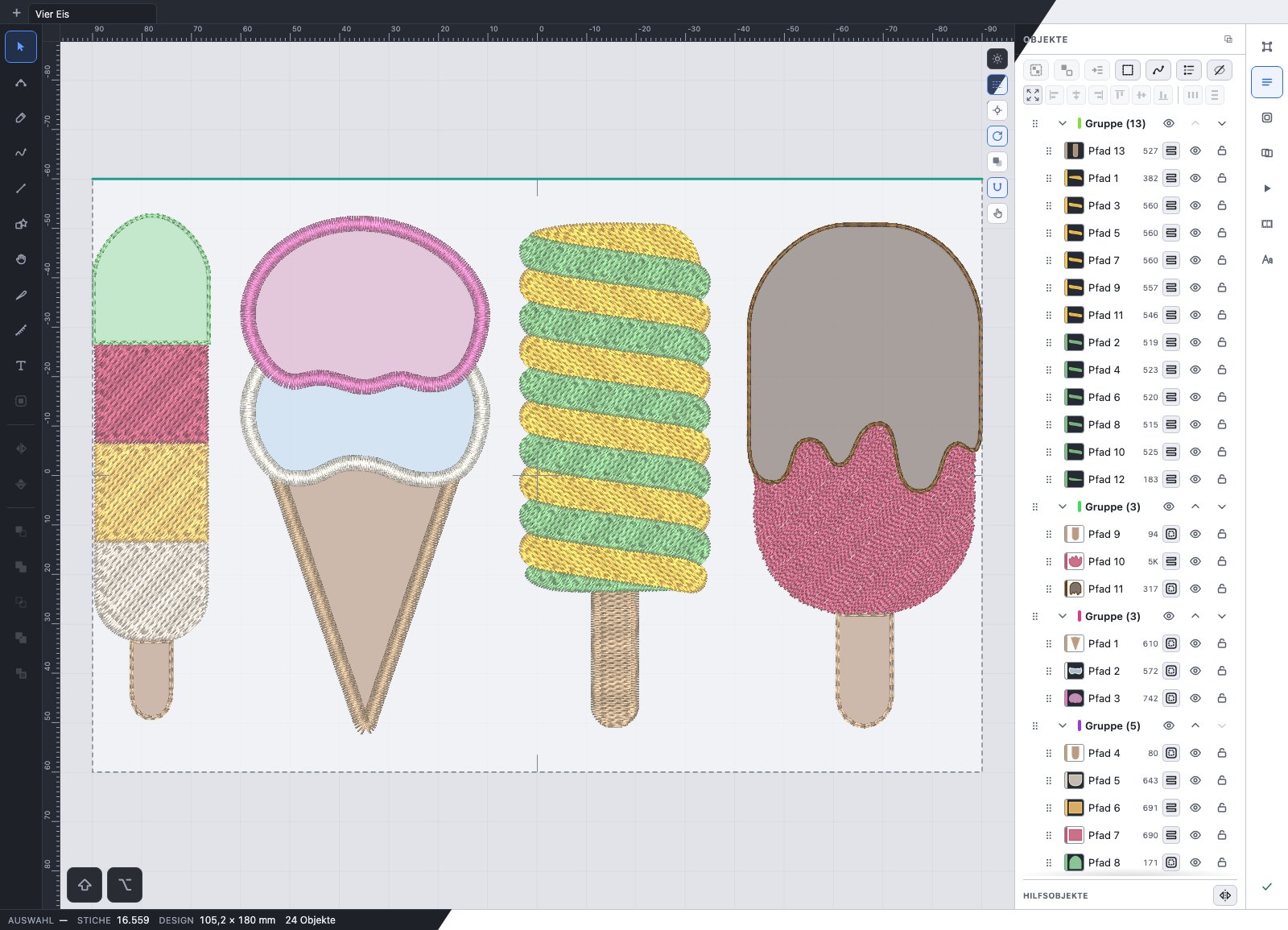
Beh.Stitched on iPad with four ice cream designs and the object list. The image shows the light and dark interface.

Features in detail

All features in detail

Import and automatic digitizing

  • Import PNG/JPG as colour areas, running-stitch lines or Redwork; import SVG and DXF as vector shapes.
  • Detect or limit colours, merge similar shades and exclude individual colours.
  • Preview before importing, with minimum area for colour areas, simplification and smoothing; line mode can also remove faint image artefacts.

Lines and Redwork

  • Import multicolour line drawings with separate thread colours.
  • Turn existing running-stitch lines into editable Redwork for each colour. Every line segment is stitched twice.
  • Disconnected parts keep their jumps. Small gaps can optionally be connected; the added connections appear in the preview.
  • Several Redwork objects stay independent, even when they share a colour.

Stitch types and parameters

  • Ten fill patterns, satin and four running-stitch types: single, triple, hand and cross stitch.
  • Create fills with several angles, a guide curve or a two-colour gradient.
  • Set underlay, pull compensation, stitch length and spacing per object; regular satin can also adjust density to its width.
  • Remove hidden fill beneath later fills or appliqué, keeping an overlap at the boundary.

Drawing and arranging

  • Edit Bézier nodes, handles and open lines; join end nodes, split shapes, unite them or subtract one from another.
  • Draw with a finger, pen or mouse. Set freehand satin width beside the drawing tool.
  • Align, distribute and group objects; change their stitching order.
  • Repeat objects along a path, on a grid or around the hoop centre or a pivot you choose.

Lettering tool

  • Load your own TTF/OTF fonts and mark favourites.
  • Choose centreline satin, outline satin or fill. Automatic mode selects fill for complex fonts and at heights of 18 mm or more.
  • Set font height, tracking and line spacing; stitch mode is remembered per font.
  • Place text on paths and curves.

Appliqué and patches

  • Placement, tack-down and cover stitches with pauses for placing and trimming fabric.
  • Set fabric type and cover stitch; change the fabric default in Settings.
  • Preview a patch outline around the visible design and adjust its distance and corner rounding.
  • Arrange patches on a grid and group their work stages.

Hoops and multi-hooping

  • Use preset or custom hoop sizes in millimetres.
  • Split large designs across a hoop grid or freely placed hoops.
  • Set seam overlap and registration marks; create a separate machine file for each hoop with a re-hooping sequence.

Checks and preview

  • Watch the stitching sequence with colour changes, jumps and thread trims.
  • Display density in colour and check warnings about overlaps, hoop boundaries or unsuitable stitch values.
  • Use the direction donut and parameter matrix to test material and settings on your own machine.

Films and pictures

  • Play the stitching sequence as thread or lines on a colour, fabric or photo background.
  • Choose a portrait, landscape, design or hoop crop.
  • With a licence, save films and PNG pictures: MP4 on iPad; on Windows and Mac the format depends on device support, usually WebM.

Embroidery-file editor

  • Open DST, EXP, PES, JEF and TAP files; change colours, order and size.
  • Split or merge blocks, delete individual stitches and edit colour changes and thread trims.
  • Add your own shapes, lettering or Redwork and convert recognised fills back into editable shapes.
  • VP3 and XXX can be exported but not imported.

Export and controls

  • Export DST, EXP, PES, JEF, VP3, XXX and TAP, plus SVG and DXF.
  • Print a colour card and worksheet.
  • Choose light, dark or system appearance; detach and resize side panels. Change numbers by typing, step buttons or dragging.
  • Exchange project files between Windows, Mac and iPad.

Account and licence

  • Optional sign-in with an email code; existing purchase and licensing methods remain available without an account.
  • Link a verified App Store or Digistore purchase and use it on iPad, Windows and Mac. Projects are not uploaded.
  • Personal licences allow three computers, commercial licences five. Your own iPads do not use computer places; shared account access requires the same Apple Account.
  • Manage devices in Settings. Verified account access works offline for up to 30 days after the last purchase check.

What does that look like in practice?

From a picture to an embroidery file, drawn by hand, or a finished file edited afterwards: a separate page shows all three ways step by step, and the manual that lives in the program.

See the walkthrough

Download

Drawing, project saving and preview are free to use. On iPad, each Apple Account gets five free machine exports once. Further exports and SVG/DXF require a licence. Free exports require internet access and iPadOS 16.3 or later.

Beh.Stitched calculates your designs on your device. Images, filenames and stitch data are not sent to our server. Internet access is needed for licence checks, the free export allowance on iPad and, if you use it, the optional account. There is no usage analysis.

Windows

Version 1.0.15 · 29.2 MB · 3 Nov 2026

For Windows 10 and 11 (64-bit). Installs Beh.Stitched for your user account and does not need administrator rights.

Not signed yet: Windows reports an unknown publisher at start. Continue through “More info” and “Run anyway”. The checksum below tells you whether you really have my file.

Download for Windows

File name and checksum
File
Beh.Stitched_1.0.15_x64-setup.exe
SHA-256
a3ab89a23ca32742831bcda52195ccfe78a3b9918f88f2afc66bc20a407ef320

The checksum is the file’s fingerprint: if you get the same string, the file arrived complete and was not changed on the way. If it differs, download again and do not install that copy.

Check it yourself on Windows (Command Prompt):
certutil -hashfile "%USERPROFILE%\Downloads\Beh.Stitched_1.0.15_x64-setup.exe" SHA256

macOS

Version 1.0.15 · 66.3 MB · 3 Nov 2026

Universal for Apple Silicon and Intel: one package for both, no choice when downloading.

Signed and notarized by Apple: macOS opens Beh.Stitched on first launch without a prompt. No right-click, no exception.

Download for macOS

File name and checksum
File
Beh.Stitched_1.0.15_universal.dmg
SHA-256
64852a67e6cfeba04d27cfbf4fadeb5335a0e9dfb12e08e1082998535d26f889

The checksum is the file’s fingerprint: if you get the same string, the file arrived complete and was not changed on the way. If it differs, download again and do not install that copy.

Check it yourself on macOS (Terminal):
shasum -a 256 ~/Downloads/Beh.Stitched_1.0.15_universal.dmg

Beh.Stitched for iPad

Beh.Stitched is now available on the App Store.

Try five machine-file exports for free. After that, you need a personal or commercial licence, available as an in-app purchase.

View on the App Store

Which format your machine expects is in its manual. Always test a new file on a scrap first.

What changed in each release is in the version history (German).

Licenses & prices for the United States

Personal and commercial licences are one-time purchases without a subscription. Drawing, project saving and preview are free to use. On iPad, each Apple Account gets five free machine exports once; these require internet access and iPadOS 16.3 or later. Further exports, SVG/DXF and saving films or pictures require a licence.

On this website you buy through Digistore24 and receive a licence key for Windows and Mac. On iPad you buy in the app through the App Store. An optional Beh.Stitched account lets you use a verified purchase across all three platforms.

Prices are in US dollars, plus applicable sales tax shown at checkout. One-time purchase, no subscription.

Your purchase is processed by Digistore24 Inc. You receive your invoice and license key by email. Enter the key in Beh.Stitched on Windows or Mac to activate your license. info@behpunktdesign.de

  • The personal license is for private use without income from embroidery files or embroidered goods. The business license allows commercial use and includes batch export of all machine formats. Both are one-time purchases.
  • Personal licences allow three simultaneously activated Windows/Mac computers, commercial licences five. Existing computers count towards a linked Digistore purchase. Your own iPads do not use computer places. Shared access requires the same Apple Account and Beh.Stitched account. Without a Beh.Stitched account, an App Store purchase remains usable directly on your associated iPads.
  • US purchases through Digistore24 Inc. have a 60-day return period. Request a refund through the support link in your Digistore24 order email.
What the licence actually covers
  • With an account, two computer replacements within 30 days are available after the initial places have been used. A released activation continues to count until its offline access expires. For a linked Digistore purchase, the Apple Account is bound on the first iPad; a change is possible after at least 30 days and after previous offline access has expired. The Apple Account of a linked App Store purchase stays bound to that purchase. The full rules are in the licence terms.
  • The embroidery files you create belong to you alone, with no credit obligation or share of proceeds. Project files can move between Windows, Mac and iPad. The optional account also lets you use your purchased licence across these platforms.
  • Enter Digistore keys on Windows or Mac; iPad purchases use the App Store. To use other platforms, link the verified purchase under “Account & licence”. Existing purchase and licensing methods remain available without an account.
  • Desktop licences and account access are confirmed online from time to time. Verified access works offline for up to 30 days after the last check; after that, export pauses until confirmation succeeds. All other functions and your designs remain available.

The licence terms apply.

Showing Beh.Stitched?

If you publish videos or posts about Beh.Stitched, a mention is welcome. You are never required to; your embroidery files are yours with no credit obligation. If you cover the program regularly, get in touch.

info@behpunktdesign.de Instagram: @beh.stitched